---
title: "easyMAIL Settings And Specifications"
type: "knowledge"
post_id: "855"
slug: "easymail-settings-and-specifications"
canonical: "https://kb.easydns.com/knowledge/easymail-settings-and-specifications/"
markdown_url: "https://kb.easydns.com/knowledge/easymail-settings-and-specifications.md"
json_url: "https://kb.easydns.com/knowledge/easymail-settings-and-specifications.json"
txt_url: "https://kb.easydns.com/knowledge/easymail-settings-and-specifications.txt"
published: "2017-08-25T13:57:37+00:00"
modified: "2025-06-25T14:51:14+00:00"
author: "ryan"
categories:
tags:
site_name: "easyDNS Knowledge Base"
publisher: "easyDNS Technologies Inc."
language: "en-US"
generator: "easyPress Markdown"
generator_version: "1.0.6"
---
**Webmail**
To access and manage your e-mail, you can log into webmail. This will allow access to filtering (vacation responses for example) and calendars (for Horde only).
- **Roundcube** webmail, please visit
- **Horde** webmail, please visit
Please refer to our [blog post announcing our introduction of Horde](https://easydns.com/blog/2020/08/11/introducing-the-new-easymail-webmail-contacts-scheduling-and-more/) and the more advanced features it offers.
—————————————————————————————–
The following are the inbound and outbound settings you will need to enable easyMail on your devices/mail clients:
**Inbound**
**• IMAP** Server Hostname: **imap.easymail.ca**
Server Port: 993 or 143
Username: yourname@yourdomain (e.g., [me@example.com)](mailto:me@example.com%29)Security Settings: TLS, SSL, or none
The default port for SSL-enabled IMAP is port 993.
Port 143 is not a secure port and not recommended
**\*\*\*OR\*\*\***
**• POP** Server Hostname: **pop.easymail.ca**
Server Port: 995 or 110
Username: yourname@yourdomain (e.g., [me@example.com)](mailto:me@example.com%29)Security Settings: TLS, SSL, or none
The default port for SSL-enabled POP is port 995.
Port 110 is not a secure port and not recommended
**Outbound**
**• SMTP** Outbound Mail Server: **mailout.easymail.ca**
Username: your full easyMAIL address (e.g., [me@example.com)](mailto:me@example.com%29)Password: your easyMAIL password
Ports: 465, 587, 2025, 20025 (port 25 is not recommended)
TLS (optional): 465 (SSL), 587, 2025, 2026, 20025, 20026
Please be sure to have an Encryption Type (such as SSL/TLS or STARTTLS) selected in your mail programme. Oftentimes it’s necessary to try another port number to establish a successful connection.
**Difference between POP and IMAP**
POP (Post Office Protocol) is a one-way ticket. You connect to our easyMAIL server in a one-time pop and download a copy of your e-mail then disconnect. With a POP setup, you can’t be managing your easyMAIL via multiple devices (mobile smartphone, laptop, tablet, etc). There is no two-way synchronisation between easyMAIL and your device. You have to delete or file the same email on every device.
IMAP (Internet Message Access Protocol) is the two-way e-mail management preferred by users with multiple devices (mobile smartphone, laptop, tablet, etc). If you are viewing your e-mail via your mobile phone, then it will show as viewed on any other device you check your mail through. All e-mail management is synchronised cutting downtime if you happen to check e-mail from multiple devices.
—————————————————————————————–
**Other Specifications**
- Default emails per day limit: 250
- Total individual e-mail size allowed (including encoded attachments): 150MB
- 5GB storage per user
- 100 mailmaps (wildcard mailmaps allowed)
- 250 recipients max per outbound message if you have the daily allowance as per our quota enforcement policy (see below for explanation) – a higher allowance allows for more recipients
- Mailbox passwords are to be 8-30 characters, with at least one uppercase, one lowercase, one special character, and one number.
—————————————————————————————–
Additional easyMail boxes can also be added for a domain. For pricing information, please see below:
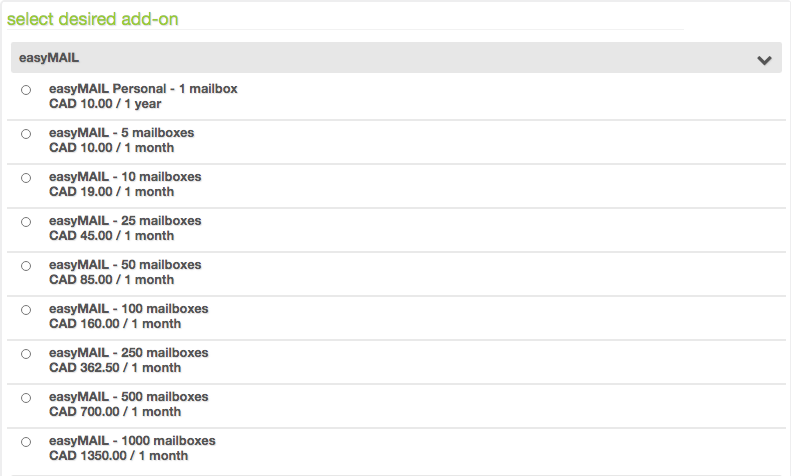
For further information on how to add additional easyMail boxes, please go [HERE](https://kb.easydns.com/knowledge/domain-add-ons-2/).
—————————————————————————————–
**Outbound Mail**
To increase your default 24 hour outbound delivery limit of 250 messages/recipients, please consider the following:
- 500 messages per day – $7.35 / month \[$74.97 / year\]
- 1000 messages per day – $13.95 / month \[$142.29 / year\]
- 2500 messages per day – $24.50 / month \[$249.90 / year\]
- 5000 messages per day – $49.00 / month \[$499.80 / year\]
- 10000 messages per day – $86.06 / month \[$877.82 / year\]
- 15000 messages per day – $129.09 / month \[$1,316.73 / year\]
- 20000 messages per day – $151.15 / month \[$1,541.74 / year\]
—————————————————————————————–
**easyMAIL 2.0 – storage allowance**
On 01 November 2020, we set firm quotas on mailbox storage size on per user basis.
Pricing for *individual* mailboxes:
- Under 5GB included with all easyMAIL mailboxes
- Between 5GB and 15GB is $2.50/month
- Between 15GB and 50GB is $12.50/month
- Between 50GB and 75GB is $20.25/month
- Between 75GB and 100GB is $25/month
Please contact us if you need more than 100GB in storage for your e-mail address
*\*billing for storage commenced on 21 April 2021*
—————————————————————————————–
**Quota Enforcement Policy**
easyMAIL quota is set to 250 messages/recipients per day \[24 hour period\] by default – you can purchase more if needed. This is calculated on a per-user \[mailbox\] basis, *not* on an aggregate per-domain basis. Each evening we reset the counter back to zero for each mailbox – midnight UTC (click [here](https://savvytime.com/converter/utc) to know when in your time zone).
—————————————————————————————–
**NOTE:** To use easyMAIL with other DNS providers, please specify our easyMAIL MX record within your DNS settings:
**MX.EASYMAIL.CA**
Pref: 0
This server is *not to be used* for IMAP or POP connections, **ONLY for the MX record**.